

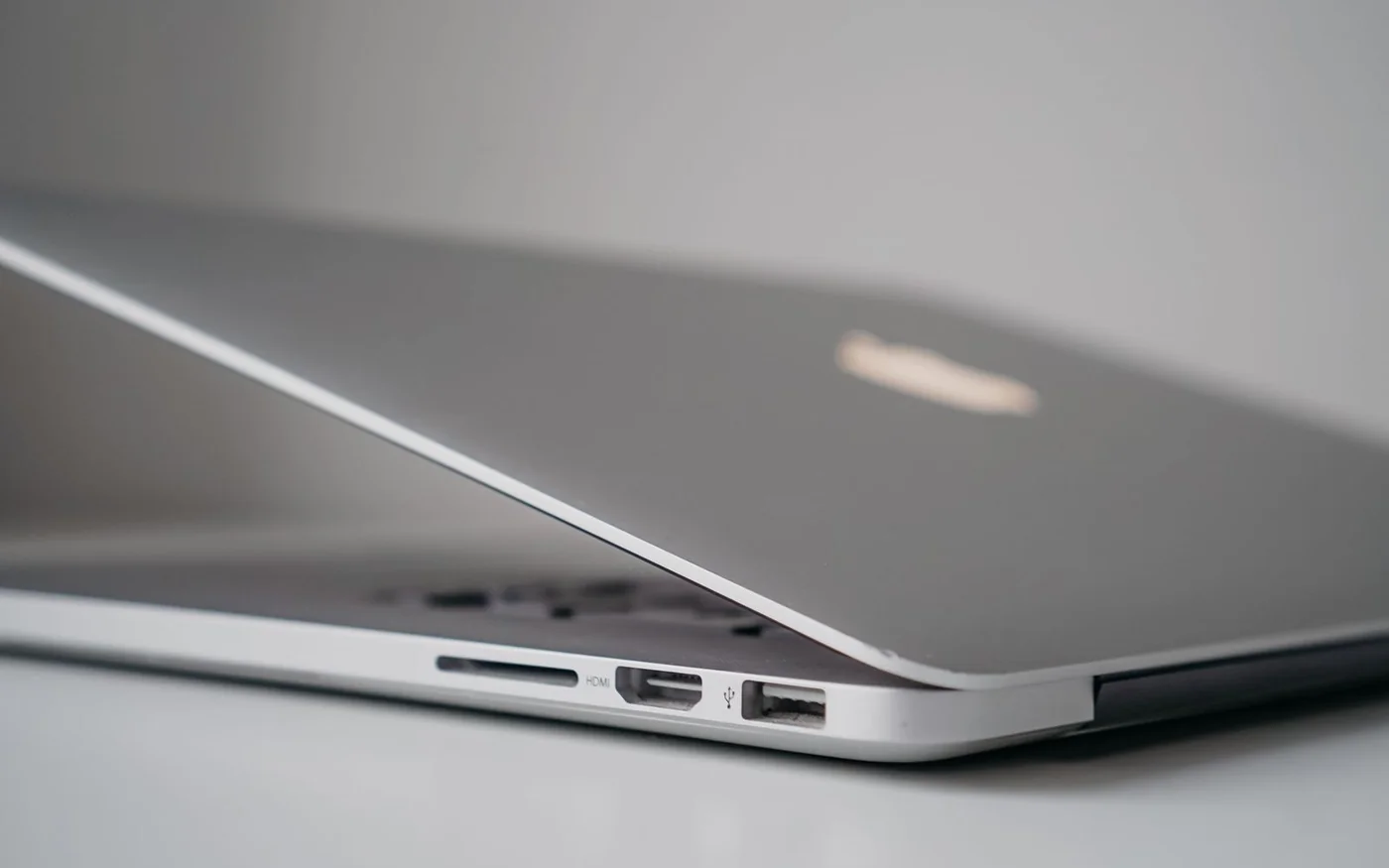
Buy the lightest laptop that can run your work and connect to the equipment you use without a bag full of extras. If you often plug into an HDMI display and carry a USB-A receiver, a lighter laptop with those ports built in can save weight twice. If you work mostly at two desks with docks already waiting and use macOS, a slightly heavier laptop with a separate charging port can still make for an easy commute.
Two UAE listings show the trade-off. On 6 November 2026, Jumbo listed the ASUS Zenbook A14 UX3407QA-QD180W in stock at AED 3,999. The laptop weighs 0.98 kg in ASUS’s specification and has a 70 Wh battery. Apple UAE listed a 13-inch MacBook Air M5, Sky Blue with 16 GB of memory and 512 GB storage, at AED 5,499. Apple specifies 1.23 kg and 53.8 Wh for the 13-inch model. The bare laptops are 250 g and AED 1,500 apart. For your own comparison, price the charger, adapters and storage you will actually need and weigh what travels with you. Jumbo UAE ASUS listing · ASUS specifications · Apple UAE configuration · Apple UAE specifications
ASUS Zenbook A14 for a lighter bag with familiar ports
The Jumbo configuration is the Zabriskie Beige UX3407QA-QD180W, with a Snapdragon X X1-26-100 processor, Windows 11 Home, 16 GB of memory and a 1 TB SSD. It has a 14-inch 1920 × 1200 OLED display and an English and Arabic keyboard. Match the full code if another seller advertises an A14. The family includes other Snapdragon chips and memory configurations. A headline battery or weight claim for the family needs to match the version you are buying. Exact Jumbo UAE listing · ASUS regional product guide
ASUS lists two USB4 Type-C ports with display and power delivery, one USB-A, HDMI 2.1 TMDS and a headphone connection for this platform. It lists a 65W USB-C adapter for the configuration class. Confirm the adapter and cable supplied with the UAE unit. If you charge over one USB-C port in a meeting room, you can still use built-in HDMI for the screen and USB-A for a presenter or receiver. When a display mode is critical, check the resolution and refresh rate supported by the laptop, cable and display together. The HDMI label by itself does not answer that question. ASUS Zenbook A14 specifications
The main compatibility question is Windows on Arm. Check whether your exact VPN, printer, specialist audio interface or other peripheral has the required Arm-compatible driver. Microsoft supports emulation for many applications and publishes separate requirements for drivers. If the application opens but its device driver fails, you can still lose the function you bought the machine to use. Get confirmation from the software or hardware vendor where this matters. Microsoft Windows on Arm FAQ
The ASUS makes sense to shortlist if you mostly work in compatible apps and regularly move between rooms where HDMI or USB-A is already available. For an organisation that supplies a standard laptop image or security software, ask IT to approve the exact platform. Compatibility confirmed before purchase is worth more than saving 250 g on a machine you will have to replace.
MacBook Air for a light macOS setup with dedicated charging
The 13-inch Sky Blue Air in this comparison is the M5 with 10-core CPU, 8-core GPU, 16 GB memory and 512 GB SSD. Apple UAE’s selected configuration lists the Arabic backlit keyboard, a 40W Dynamic Power Adapter with 60W Max and free shipping. Check the keyboard and adapter when selecting your exact model, particularly if the seller is importing the machine from another market. Apple UAE exact MacBook Air configuration
It has two Thunderbolt 4 ports, MagSafe 3 and a headphone jack. MagSafe charging leaves both Thunderbolt ports available. At a desk that already has a compatible USB-C display or dock, you may be able to use the setup without carrying a separate hub every day. Apple lists support for up to two external displays under specified modes. Check the resolutions, refresh rates and dock compatibility if you plan to drive two screens. HDMI and USB-A accessories need a suitable adapter, hub or dock. Apple UAE MacBook Air technical specifications
Picture your busiest desk before buying. If the display takes one Thunderbolt port and the backup drive takes the other, MagSafe lets you charge without changing either connection. If you also need a wired network or card reader, choose a dock that supports those jobs and test it with the actual displays. When you travel to unfamiliar rooms, keep the adapter that covers the connection you most often encounter. Buying a wide assortment of adapters for ports you rarely touch can undo the simplicity you wanted.
Battery capacity and battery hours answer different questions
The ASUS has 70 Wh and the 13-inch Air has 53.8 Wh on the published specifications. Capacity tells you how much energy is stored. How fast the laptop uses it depends on the display, processor, settings and workload. Apple rates the 13-inch Air for up to 18 hours of video streaming or 15 hours of wireless web in its tests. Those figures describe two different workloads, neither of which reproduces a full day with calls, external drives and bursts of heavier work. Use the test details to interpret the numbers. Apple UAE battery specifications and test notes · ASUS A14 technical specifications
If you need to work through a morning of calls, ask how the laptop behaves with the camera and microphone active and your usual screen brightness. For a day spent mostly reading and editing documents, a wireless web test is closer to what you do than a local video loop, though the site mix and brightness still matter. If you can use the laptop under the seller’s applicable return terms, run a typical block of work and watch the change in charge over a few hours. Compare the two machines using the same task if both are available to you.
Also check the charger that stays in the bag. Both options have USB-C charging capability. If you intend to use a spare charger, check the required power, the cable and what happens when the charger is shared with a phone. A charger that tops up a sleeping laptop can behave differently while the laptop is under load. If the route has a reliable charging point, carrying a smaller kit may be realistic. If the only socket is shared by a room full of people, plan for the longest stretch away from it.
Compare the bag you will carry
Put your current charger, cable, hub, sleeve and any drive you bring most days on a kitchen scale. Weigh them together or make a list of their weights. Add those pieces to the bare laptop weight for each candidate, keeping desk-only equipment separate. If your current setup needs 250 g of adapters and the new one has the relevant ports built in, you have saved the equivalent of the bare-laptop gap in accessories alone. That is an example of the arithmetic. Use the weights of your own equipment.
Size also matters when moving through Dubai by Metro or carrying a laptop beside a water bottle and lunch. Try the sleeve or bag you already own and look at the depth and width of the computer, not just the diagonal of the display. A compact screen with comfortable text scaling can work well on a cramped table. A larger screen helps if you often read a document beside a spreadsheet. Test that arrangement at a size you can read for more than a few minutes.
Try your regular connections in the order you use them
At a hot desk, start with the screen. Find out whether the cable on the desk is HDMI or USB-C, and whether it also provides power. If it is a USB-C monitor, confirm that its power output is enough for your laptop and that the cable supports the display. Add the mouse, keyboard and storage next. If the desk has only one usable cable for everything, a dock may be the better arrangement even when your laptop has each of the ports built in. If you move between rooms throughout the day, a direct connection can be easier to troubleshoot under time pressure.
For photographers and anyone who regularly transfers files from removable media, put the reader and drive into the weight calculation. Neither of these port lists includes a built-in SD reader. If you want to copy to an external drive while you work, check which port each device uses and where the charger connects. The Mac’s 512 GB and the ASUS’s 1 TB are different storage configurations. Consider whether the difference will change how often you need a separate drive. An extra drive that lives at home has a different cost in bag space from one that has to go everywhere.
If you give presentations, plan for the least accommodating room you use regularly. For an HDMI-only room, test the direct port or the adapter with your intended resolution and sound before the first meeting. If you regularly connect to two screens, bring both into the compatibility check rather than assuming one working monitor proves the second will work. Once you have a setup that works, put the necessary cables into one small pouch. That lets you weigh and price the real kit and makes it easier to see when a lighter laptop would still require the same accessories.
Confirm what the UAE price covers
Jumbo’s listing shows a two-year warranty for this ASUS configuration. Confirm the issuer, local service route and whether any accessory has separate coverage. Jumbo publishes free standard shipping for eligible orders above AED 2,000 in its designated areas. Its returns policy has conditions, including restrictions around opened items, so confirm how you can check compatibility before opening the box if that is still in doubt. Jumbo delivery · Jumbo returns · Jumbo warranty information
Apple UAE publishes a one-year limited manufacturer warranty and a 14-calendar-day change-of-mind period from delivery for eligible standard hardware purchased direct. Optional protection is a separate purchase. If a reseller offers a lower price, confirm the exact configuration and the terms attached to its invoice. The AED 3,999 and AED 5,499 comparisons are public prices. Actual delivery dates and final checkout totals were unverified. Apple UAE returns and warranty terms
For the ASUS, confirm the required Windows on Arm software before paying. For the Air, map the ports and display setup you will use at your regular desks and on the road. If one option fits the entire route with fewer things to remember, use that to make the decision alongside its price and weight.
Official accounts for product and retailer updates. Apple on Instagram · Jumbo on Instagram


Comments (0)
No comments yet. Be the first!