

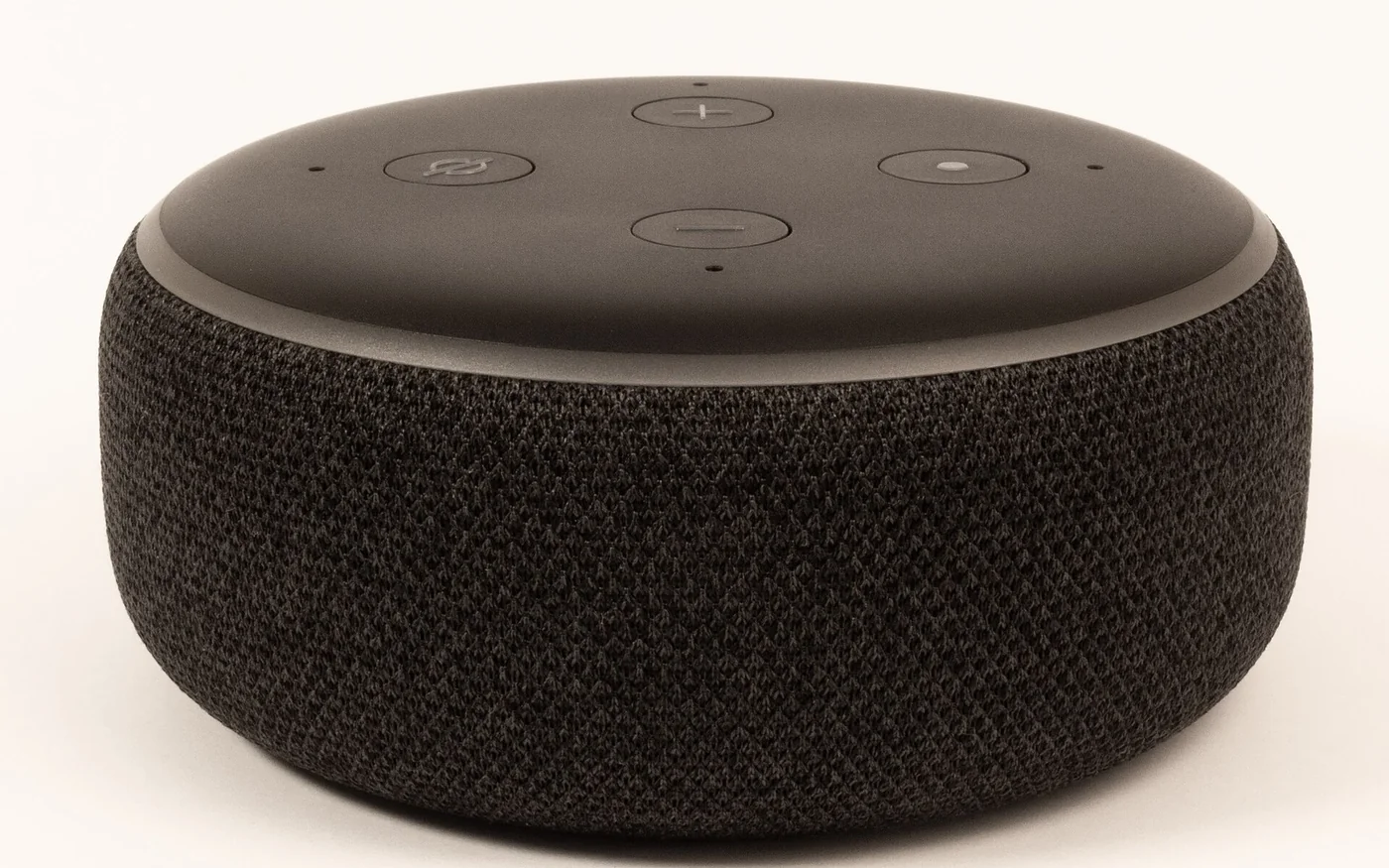
If Gulf Arabic voice commands are the main reason you're buying, start with a UAE-compatible Echo and confirm the exact unit before paying. Amazon documents Alexa's Khaleeji Arabic support in the UAE. Sonos also lists Alexa as available in the UAE, but Arabic is absent from its published list of Alexa languages on Sonos. The same assistant name can lead to different choices on two speakers. Amazon Science on Arabic Alexa · Sonos Alexa availability
For music played mostly from your phone, consider the controls you actually need. The UAE Sonos catalogue shows Era 100 at AED 999 and Era 100 SL at AED 899. The SL gives you connected playback without built-in voice control. The Era 100 has voice capability and a physical microphone switch. Sharaf DG's marketplace showed a charcoal fifth-generation Echo Dot at AED 209. Treat that as a price reference for the advertised unit and check its regional version before buying it for Arabic. Sonos UAE speaker prices · Sonos UAE Era 100 specifications · Sharaf DG Echo Dot listing
Echo for local voice commands, with a check on the exact variant
Amazon says Arabic Alexa launched in the UAE and Saudi Arabia, and describes building it to understand both Modern Standard Arabic and Gulf dialects. Its current developer documentation includes the UAE among supported regions. Check the exact speaker, country or marketplace setting and selected language together. An imported version can be advertised on a UAE site without the listing establishing the Arabic options you need. Ask the seller to confirm the box code and the available device language in the UAE. If the household mixes Arabic and English, ask about that combination on the exact model. Support for two languages in a product family doesn't tell you how the speaker handles a conversation that switches between them. Amazon Science on Arabic Alexa · Amazon Alexa regional documentation
Sharaf DG's charcoal fifth-generation Echo Dot listing identifies model number B09B8V1LZ3, with Amtradez as the seller. It showed AED 209 including VAT and Add to Cart. It also displayed AED 13 shipping to its sample Deira City Centre location. That would make AED 222 using the displayed amounts, subject to what applies to the actual order. The listing doesn't establish Gulf Arabic for that particular box. If Arabic is the reason for buying, get confirmation before ordering or select an offer whose exact regional language support the seller can substantiate. Ask who provides local warranty service and whether the supplied plug fits your socket. Sharaf DG Echo Dot listing
Amazon's setup instructions use the Alexa app, an Amazon account and Wi-Fi. Check the app on the phone you will use to manage the speaker. If the Echo is for someone else, decide whose account it belongs to and who will link the streaming service. That choice matters if the owner will later need to change the Wi-Fi, review activity or remove the speaker from the account. Once the basic setup works, check the language menu and the features you bought it for before linking extra services. Amazon Echo setup guide
Anghami announced a skill for Echo users in the UAE and Saudi Arabia in Arabic and English. Use the current Alexa app to check whether it can be added to your account and whether the functions you want work in the language you selected. Test a particular playlist, an artist you actually listen to and a spoken request for one track. A service that can be linked may still handle voice requests differently from the app on your phone. Amazon's developer documentation explains that skills are published for particular combinations of language and location. Anghami on its UAE and Saudi Alexa skill · Amazon Alexa skill locales
Sonos Era 100 for app-led listening with optional voice
Sonos lists the UAE as an Alexa region for supported Sonos hardware. Its language list includes several English variants, plus French and other languages. Arabic is absent. The company's own Sonos Voice Control is a different service, documented in US English and French. If your main request is a Gulf Arabic timer or a particular regional skill, the Sonos Alexa badge alone gives you little reason to pay more. If you mainly want to play music from your phone and sometimes pause it by voice, compare which assistant and service work for those actions. Sonos Alexa availability · Sonos Voice Control languages and requests
The Era 100 supports Wi-Fi, Bluetooth and Apple AirPlay 2. Sonos says that before you use Bluetooth, you need to set it up on Wi-Fi with the Sonos app. A new system setup calls for creating or signing in to a Sonos account. This matters if the speaker is for a relative who expects to turn it on and pair immediately, or for a room where the Wi-Fi network is difficult to join. Check who can set up the speaker and who will manage it afterward. Bluetooth is a playback option after setup. Sonos UAE Era 100 specifications · Sonos Era 100 setup
The UAE Sonos catalogue's AED 999 is a brand list price. A Sharaf DG listing for the black Era 100, E10G1UK1BLKR2, showed AED 1,149 including VAT from DGPLUS with a two-year warranty label. That's AED 150 above the brand catalogue figure. Compare stock and the service route before treating them as equivalent offers. Ask who handles warranty claims on the exact variant and whether the box includes the mains lead you expect. Sonos UAE speaker prices · Sharaf DG Sonos Era 100 listing
Era 100 SL for a room where you use your phone
The Sonos UAE Era 100 SL listing shows AED 899, AED 100 below the voice-capable model in the brand's range. It lists Wi-Fi, Bluetooth, AirPlay 2 and touch controls. Sonos describes it as having no built-in voice control. If you're buying for music from an app and want to avoid putting a voice assistant in the room, this makes the distinction clear before you set it up. The connected playback features still call for Wi-Fi and the Sonos app at setup. Sonos UAE Era 100 SL listing · Sonos UAE Era 100 SL setup requirements
The SL suits a room where someone usually starts playback on their phone and uses the speaker controls for volume or pause. If you sometimes want a voice command to turn the music down from across the room, decide whether the extra AED 100 and the Era 100's microphone switch are useful to you. There's also a difference between a phone's assistant starting an AirPlay stream and an assistant built into the speaker. Think about which device will hear the request and which one has to be available at the time.
Test the playback route and the account
There are three useful ways to ask whether a service works. Can the Sonos or Alexa app add your account? Can your phone send sound over Bluetooth, AirPlay or a supported direct connection? Can the speaker itself start a specific song when you ask it out loud? Each is a separate check. Sonos documents Spotify Free and Premium support, with limits on skips for free accounts. It also documents Apple Music support with some features remaining in Apple's own app. Check the service in your actual account before buying a speaker mainly to control that service by voice. Spotify on Sonos · Apple Music on Sonos · Sonos content service setup
For a shared home, decide which services should belong to the person setting up the speaker. A listener can enjoy a shared playlist without necessarily needing access to shopping, calling or other personal functions. Try the commands each person will use, in the language they plan to use. If smart-home control is the reason for buying, check one actual device model in the relevant platform and verify the action you want, such as turning a lamp off. A compatible logo leaves details such as account linking and supported actions to the individual integration. Amazon Echo setup and features · Amazon Alexa regional documentation
Check the room and the people who will use it
For the kitchen, try the timer, one music request and a stop command from where you normally stand. Use the household's usual language and the actual names of any devices it will control. A command that works when said beside the speaker in a quiet shop can be harder to judge over an extractor fan or running water. For a living-room speaker, test starting music from the phones people already use. If one person uses AirPlay and another uses Bluetooth, check both routes before choosing the speaker as a shared system.
Decide what you want guests to be able to do. A friend picking a playlist can use a phone playback route you are comfortable sharing. Calling features, room announcements and other personal integrations are separate choices. Amazon describes Announcements as one-way and Drop In as two-way on supported devices. If those functions are part of your plan, check their availability and permissions under the account that will run the speaker. For a guest room where a physical control is important, consider whether guests can see and reach the mute button or whether a model without built-in voice is easier to explain. Amazon Echo setup and features
What mute does and what to check in the app
On an Echo Dot, Amazon documents a microphone-off button and a red indicator when the microphones are disconnected. The Alexa app can still control the device. In the app, Amazon provides Alexa Privacy controls to review and delete voice recordings and transcripts associated with the account. Use the hardware button when you want the speaker to stop accepting hands-free requests. Use the account settings when you want to review stored activity or change how data is managed. Those controls solve different problems. Amazon Echo microphone control · Amazon Alexa privacy FAQ
The Era 100 has a rear switch that Sonos says cuts power to the microphone hardware. Sonos's UAE privacy policy distinguishes Classic Sonos Voice Control, where audio is processed locally, from other voice services and modes with different processing. If you enable Alexa on Sonos, read the Alexa privacy settings too. Local processing for Classic Sonos Voice Control describes how it handles audio. The privacy policy separately describes account and usage data, and third-party voice services have their own terms. Sonos UAE Era 100 specifications · Sonos UAE privacy policy
Before paying, save the model number, seller and warranty promise. If the seller's return window matters for checking a regional feature, confirm whether opening, setup or activation changes eligibility. Sharaf DG shows return terms on the listings, with conditions and exclusions. Check those terms against the precise offer. Then buy for the action you'll use most often, whether that's asking in Gulf Arabic, playing a specific service from your phone or keeping the speaker out of the room's voice setup. Sharaf DG UAE returns and warranty





Comments (0)
No comments yet. Be the first!